# AES3
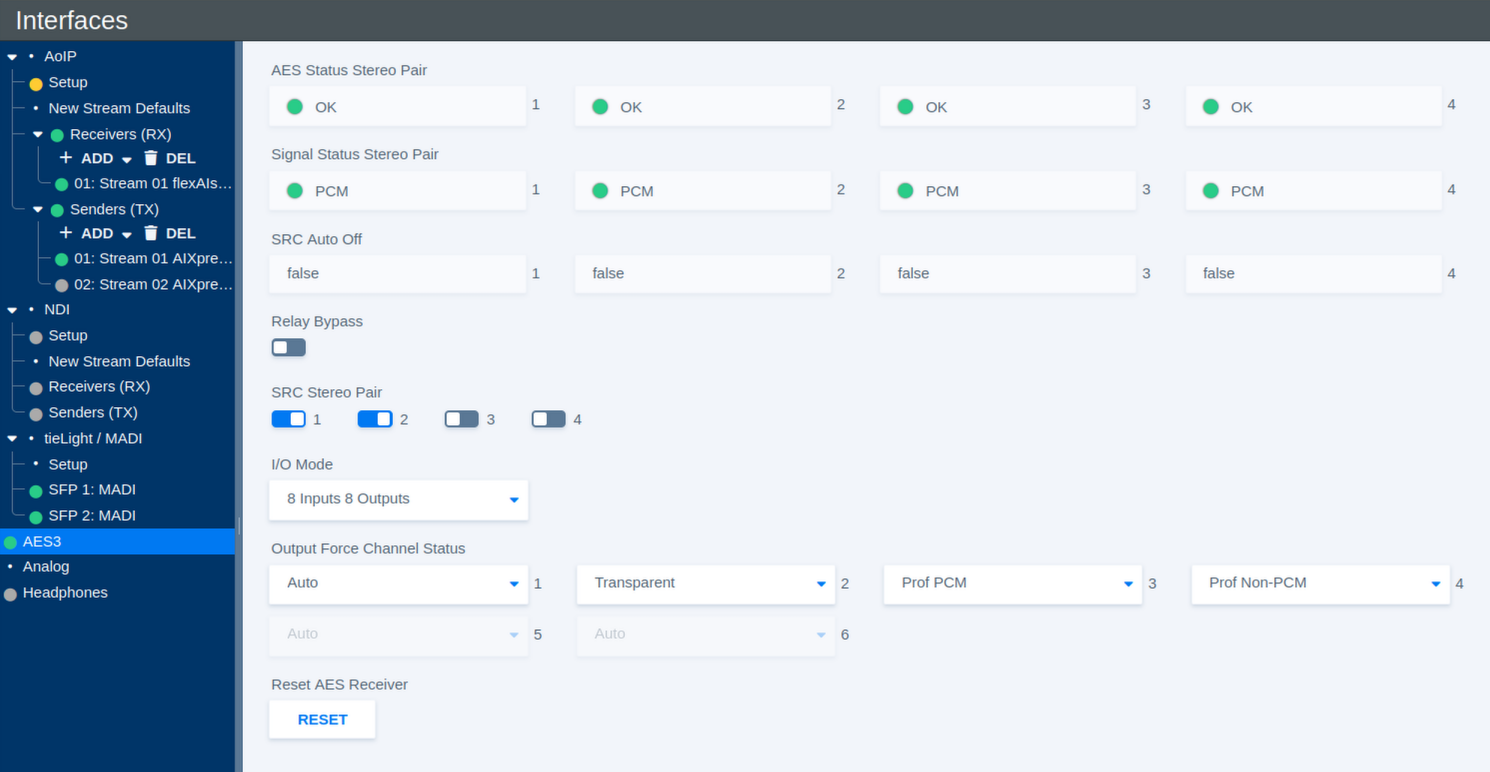
The **AES3** page provides configuration and status information for the system's AES3 inputs and outputs. **AES3**, also commonly referred to as **AES/EBU**, is a professional digital audio interface standard for transmitting two channels of audio together with related channel status information.
The interface is organized in stereo pairs. Depending on the selected I/O mode, the available AES3 connections are configured either as **8 Inputs / 8 Outputs** or **4 Inputs / 12 Outputs**.
[](https://docs.junger.audio/uploads/images/gallery/2026-09/scaled-1680-/q0XIEolaxzHw617T-aes3.png)
#### Input Status
The input status indicators provide information about the AES3 signal detected on each stereo pair.
| Parameter | Values | Default | Description |
|---|
| AES Status Stereo Pair | Status | - | Shows whether a valid AES3 signal is detected for each input stereo pair. |
| Signal Status Stereo Pair | Status | - | Shows the detected signal type for each stereo pair, for example \*\*PCM\*\*. |
| SRC Auto Off | Status | - | Shows whether the Sample Rate Converter (SRC) has been automatically disabled for the corresponding stereo pair. |
#### Sample Rate Conversion
Sample Rate Conversion can be enabled individually for each AES3 input stereo pair.
| Parameter | Values | Default | Description |
|---|
| SRC Stereo Pair 1–4 | On / Off | - | Enables or disables Sample Rate Conversion for the corresponding AES3 input stereo pair. SRC allows incoming AES3 signals with a different or asynchronous sample rate to be converted to the system sample rate. |
#### Relay Bypass
| Parameter | Values | Default | Description |
|---|
| Relay Bypass | On / Off | - | Activates the AES3 relay bypass path, allowing the corresponding AES3 signal path to bypass normal processing where supported by the hardware. |
#### I/O Mode
The available AES3 connections can be distributed between inputs and outputs in two ways.
| Parameter | Values | Default | Description |
|---|
| I/O Mode | 8 Inputs 8 Outputs / 4 Inputs 12 Outputs | - | Selects how the available AES3 interfaces are allocated between inputs and outputs. |
#### Output Channel Status
AES3 carries additional **Channel Status** information alongside the audio data. The **Output Force Channel Status** settings define how this information is generated for each AES3 output stereo pair.
| Parameter | Values | Default | Description |
|---|
| Output Force Channel Status | Auto / Transparent / Prof PCM / Prof Non-PCM / Consumer PCM / Consumer Non-PCM | - | Defines the AES3 Channel Status information transmitted with the corresponding output stereo pair. |
The available modes are:
| Mode | Description |
|---|
| Auto | Automatically generates channel status information appropriate for the transmitted signal. |
| Transparent | Passes the available incoming channel status information through to the output without intentionally changing its format. |
| Prof PCM | Forces professional AES3 channel status and identifies the signal as linear PCM audio. |
| Prof Non-PCM | Forces professional AES3 channel status and identifies the signal as non-PCM data. |
| Consumer PCM | Forces consumer-format channel status and identifies the signal as linear PCM audio. |
| Consumer Non-PCM | Forces consumer-format channel status and identifies the signal as non-PCM data. |
The **Non-PCM** modes are intended for signals carrying encoded or other non-linear audio data rather than conventional PCM samples.
#### Reset AES Receiver
In case an AES3 receiver does not lock correctly to an incoming signal, the corresponding receiver status may remain red.
| Parameter | Values | Default | Description |
|---|
| Reset AES Receiver | Button | - | Resets the AES3 receiver state. If an input does not lock correctly and its status remains red, click **Reset** to re-establish synchronization with the incoming signal. |
Depending on the hardware platform, the **Reset AES Receiver** button may not be available. On these systems, receiver recovery is monitored and handled automatically.