| Parameter | Values | Default | Description |
|---|---|---|---|
| Protocol Selection | Available AoIP protocols | - | Selects the protocol used by the sender. The available settings may change depending on the selected protocol. |
| Parameter | Values | Default | Description |
|---|---|---|---|
| Session Status | Status | - | Shows the overall status of the transmit session. |
| RTP Status | Status | - | Shows whether RTP packets are currently being transmitted. |
| SDP | Status / SDP data | - | Shows the Session Description Protocol data generated for the transmitted stream. This information can be used to configure compatible receivers. |
| Provisional Stream Status | Diagnostic information | - | Provides detailed sender statistics and diagnostic information about the outgoing RTP stream. |
| Reset Sender Status | Button | - | Resets the displayed sender status and diagnostic counters. |
| RTP Status – Leg 1 | Status | - | Shows the transmit status of the first stream leg. |
| RTP Status – Leg 2 | Status | - | Shows the transmit status of the redundant second stream leg when ST 2022-7 is used. |
| Parameter | Values | Default | Description |
|---|---|---|---|
| Enable | On / Off | - | Enables or disables the sender. |
| Stream Name | Text | - | Defines the name used to identify and advertise the transmitted stream. |
| Channel Count | Supported channel counts | - | Defines the number of audio channels carried by the stream. |
| Packet Time | Supported packet times | - | Defines the duration of audio carried by each RTP packet. Shorter packet times reduce transport latency but increase the packet rate and processing load. |
| Seamless Protection Switching (ST 2022-7) | On / Off | - | Enables SMPTE ST 2022-7 seamless protection switching. When enabled, two equivalent stream legs are transmitted over separate network paths. |
| Codec | Available codecs | - | Defines the audio codec or sample format used for the transmitted stream. |
| DSCP | Auto / Available DSCP values | - | Defines the Differentiated Services Code Point used to classify the outgoing RTP traffic for Quality of Service (QoS). **Auto** applies the DSCP value configured for the corresponding stream type and packet time on the AoIP Setup page. |
| Auto RTP Payload Type | On / Off | - | Automatically assigns the RTP payload type. Disable this option to specify the payload type manually. |
| RTP Payload Type | RTP payload type | - | Defines the RTP payload type when automatic assignment is disabled. |
| RTP Port | Port number | - | Defines the UDP destination port used for the RTP stream. |
| TTL | Number of network hops | - | Defines the IP multicast Time To Live (TTL), limiting how many routed network hops the multicast stream can traverse. |
| Parameter | Values | Default | Description |
|---|---|---|---|
| Destination IP Address – Leg 1 | Multicast IP address | - | Defines the multicast destination address used to transmit the first stream leg. |
| Media Interface – Leg 1 | Available Media Interfaces | - | Selects the Media Interface used to transmit the first stream leg. |
| Destination IP Address – Leg 2 | Multicast IP address | - | Defines the multicast destination address used to transmit the redundant second stream leg. |
| Media Interface – Leg 2 | Available Media Interfaces | - | Selects the Media Interface used to transmit the redundant second stream leg when ST 2022-7 is enabled. |
Each sender can be assigned individually to one of the available **Media Interfaces**. This allows different senders, and, with ST 2022-7, individual stream legs, to use separate physical AoIP networks.
In combination with the internal audio routing, flexAI can also transfer audio between otherwise independent AoIP networks: audio received through one Media Interface can be routed internally and transmitted again through a sender assigned to another Media Interface. This operates at the audio level rather than as a network bridge.
With **ST 2022-7** enabled, both legs carry equivalent audio data over independent network paths. A compatible receiver can use both legs for seamless protection against packet loss or a failure of one network path. ### Livewire Sender Settings When **Livewire** is selected under **Protocol Selection**, some sender parameters differ from those used for ST 2110. [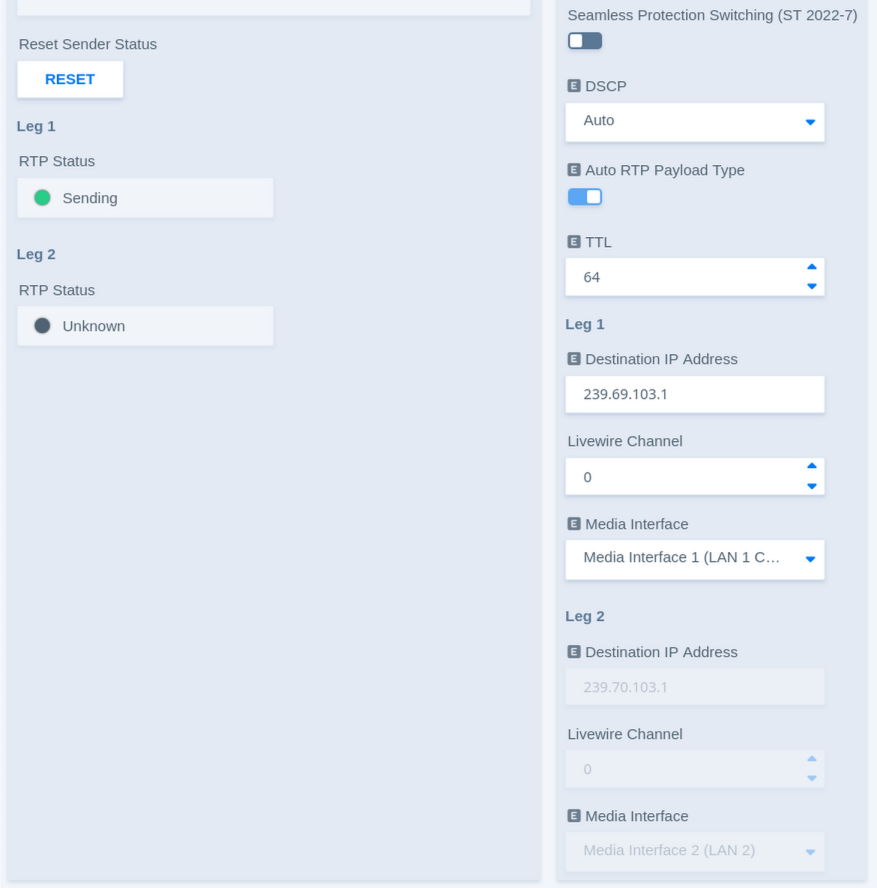](https://docs.junger.audio/uploads/images/gallery/2026-09/scaled-1680-/2sn9HkyMv2TUEPMt-aoip-sender-3-livewire.png) The general sender controls, status information, packet time, DSCP, and redundancy settings operate in the same way as described above. Livewire additionally uses a **Livewire Channel** to identify the transmitted stream.| Parameter | Values | Default | Description |
|---|---|---|---|
| Destination IP Address – Leg 1 | Multicast IP address | - | Shows or defines the multicast destination address used for the first Livewire stream leg. |
| Livewire Channel – Leg 1 | Livewire channel number | - | Defines the Livewire Channel used for the first stream leg. The channel number identifies the stream within the Livewire network and corresponds to its multicast destination. |
| Media Interface – Leg 1 | Available Media Interfaces | - | Selects the Media Interface used to transmit the first Livewire stream leg. |
| Destination IP Address – Leg 2 | Multicast IP address | - | Shows or defines the multicast destination address used for the redundant second Livewire stream leg. |
| Livewire Channel – Leg 2 | Livewire channel number | - | Defines the Livewire Channel used for the redundant second stream leg. |
| Media Interface – Leg 2 | Available Media Interfaces | - | Selects the Media Interface used to transmit the redundant second stream leg when ST 2022-7 is enabled. |