Audio over IP - Setup
The AoIP section under Interfaces provides the configuration and status information for Audio over IP operation.
Important - IGMP Snooping must be enabled on all switch ports connected to flexAI systems. Otherwise, forwarded multicast traffic may stress the connected system.
Expand AoIP in the Interfaces menu and select Setup.
Note - Some AoIP parameters are only visible when **Show Expert Settings** is enabled. Enable this option to display all parameters described in this section.
The page is divided into several sections for general AoIP configuration, network interfaces, synchronization, Livewire, NMOS, receiver settings, and sender settings.
Changes to some low-level AoIP settings may temporarily interrupt active AoIP streams. Where this applies, a corresponding message is shown on the page.
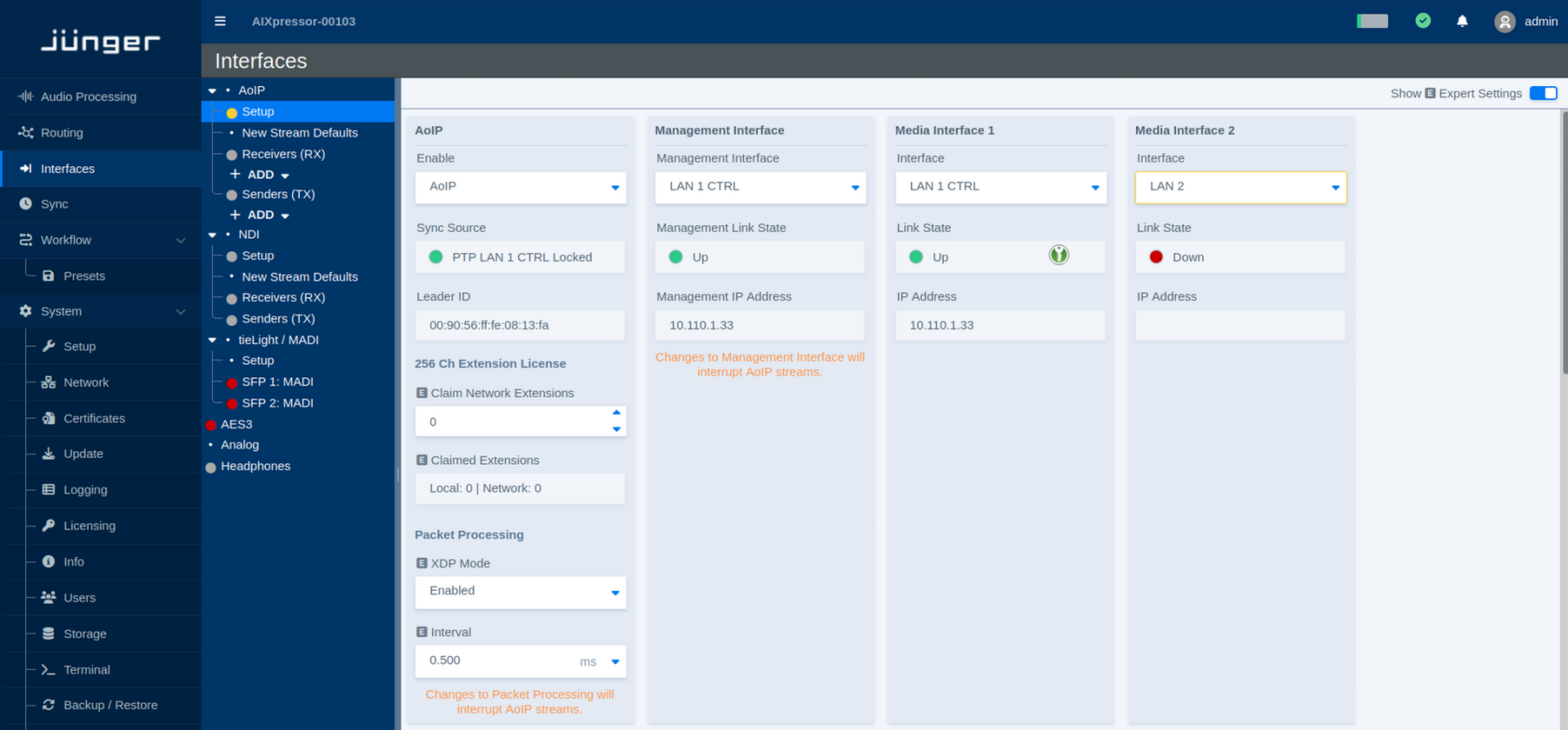
AoIP
This section controls the general AoIP operation and shows the current synchronization status.
| Parameter | Values | Default | Description |
|---|---|---|---|
| Enable | Available AoIP modes / Disabled | - | Enables or disables Audio over IP operation. |
| Sync Source | Status | - | Shows the synchronization source currently used for AoIP and whether the clock is locked. |
| Leader ID | Status | - | Shows the identifier of the PTP Leader Clock currently providing synchronization on the network. |
Channel Extension License
Additional licensed AoIP channel capacity can be made available locally or through network licensing.
| Parameter | Values | Default | Description |
|---|---|---|---|
| Claim Network Extensions | Number of extensions | - | Defines how many available channel extension licenses should be claimed from the network. |
| Claimed Extensions | Status | - | Shows the number of channel extensions currently claimed from local and network license sources. |
Packet Processing
These parameters control low-level packet processing for AoIP.
XDP provides highly efficient packet processing close to the network interface, reducing the CPU overhead associated with AoIP traffic. This makes it possible to handle higher packet rates and very small packet times more efficiently.
| Parameter | Values | Default | Description |
|---|---|---|---|
| XDP Mode | Enabled / Disabled | - | Enables or disables XDP-based packet processing for AoIP. |
| Interval | Supported intervals | - | Defines the packet-processing interval. Incoming packets are collected for this period and then passed on for processing as a group. |
Changing packet-processing settings may interrupt active AoIP streams.
Management Interface
The Management Interface is used for AoIP control and management communication.
The **Management Interface** is used for AoIP control and management traffic, including protocols such as **NMOS**. Selecting the correct Management Interface is therefore important, as these services may be restricted to this interface.
| Parameter | Values | Default | Description |
|---|---|---|---|
| Management Interface | Available network interfaces | - | Selects the network interface used for AoIP management communication. |
| Management Link State | Status | - | Shows whether the selected management interface has an active network link. |
| Management IP Address | Status | - | Shows the IP address assigned to the selected management interface. |
Changing the Management Interface may interrupt active AoIP streams.
Media Interfaces
Media Interfaces carry the AoIP media traffic. Up to four Media Interfaces can be configured, depending on the system and its available network interfaces.
All Media Interface sections use the same parameters.
| Parameter | Values | Default | Description |
|---|---|---|---|
| Interface | Available network interfaces / Disabled | - | Selects the network interface used for AoIP media traffic. Select **Disabled** if the Media Interface is not required. |
| Link State | Status | - | Shows the current physical link state of the selected network interface. |
| IP Address | Status | - | Shows the IP address assigned to the selected Media Interface. |
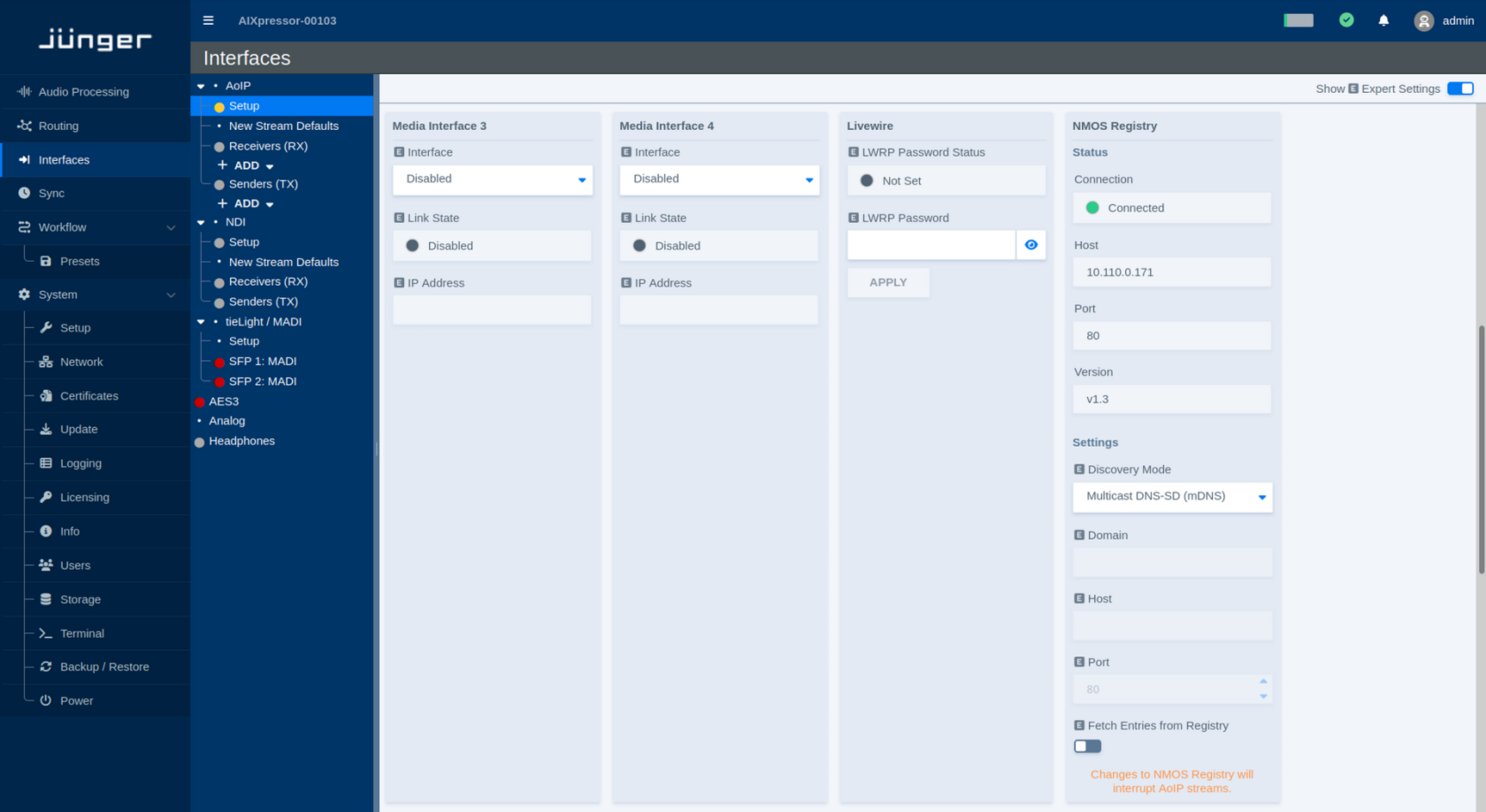
Livewire
The Livewire section provides the password used for Livewire Routing Protocol (LWRP) access.
| Parameter | Values | Default | Description |
|---|---|---|---|
| LWRP Password Status | Status | - | Indicates whether an LWRP password has been configured. |
| LWRP Password | Password | - | Sets the password used for LWRP access. Use the visibility icon to show or hide the entered password. |
| Apply | Button | - | Applies the entered LWRP password. |
NMOS Registry
The NMOS Registry section shows the current NMOS registry connection and provides the corresponding discovery settings.
Status
| Parameter | Values | Default | Description |
|---|---|---|---|
| Connection | Status | - | Shows whether the flexAI system is currently connected to an NMOS Registry. |
| Host | Status | - | Shows the address of the currently used NMOS Registry. |
| Port | Status | - | Shows the port used for the current registry connection. |
| Version | Status | - | Shows the NMOS API version used for the registry connection. |
Settings
| Parameter | Values | Default | Description |
|---|---|---|---|
| Discovery Mode | Available discovery modes | - | Selects how the NMOS Registry is discovered. |
| Domain | Domain name | - | Defines the DNS domain used for registry discovery when required by the selected Discovery Mode. |
| Host | Host name or IP address | - | Defines the NMOS Registry host when manual registry configuration is used. |
| Port | Port number | - | Defines the port of the manually configured NMOS Registry. |
| Fetch Entries from Registry | On / Off | - | Enables retrieval of available entries from the connected NMOS Registry. |
Changing the NMOS Registry configuration may interrupt active AoIP streams.
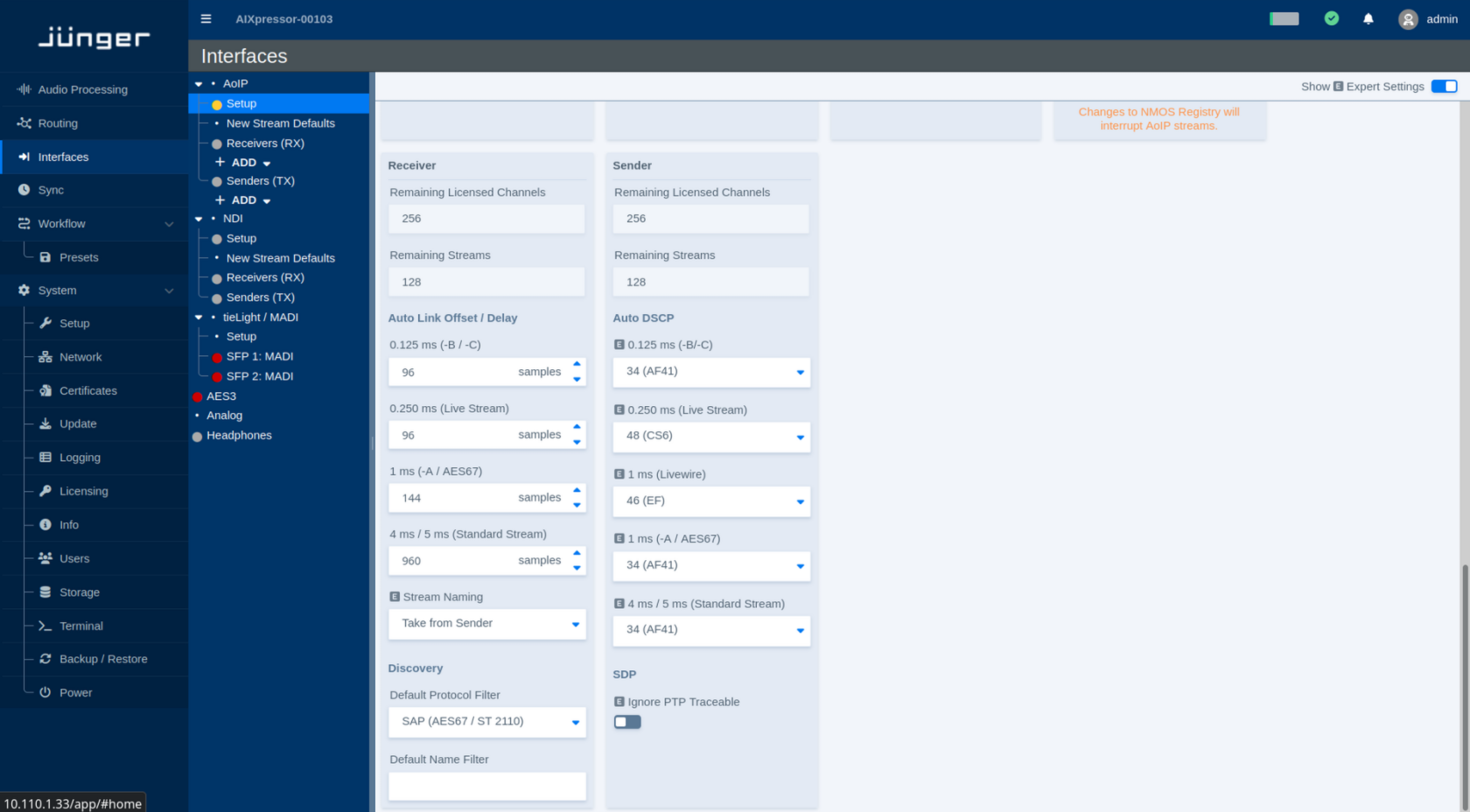
Receiver
The Receiver section shows the remaining receiver capacity and defines default behavior for automatically connected streams and stream discovery.
Capacity
| Parameter | Values | Default | Description |
|---|---|---|---|
| Remaining Licensed Channels | Status | - | Shows the number of licensed receive channels that are currently still available. |
| Remaining Streams | Status | - | Shows the number of additional receiver streams that can currently be created. |
Auto Link Offset / Delay
The Auto Link settings define the receiver delay used when streams are connected automatically. Separate values are provided for the supported stream and packet-time classes.
Auto Link Offset defines the fixed receive/playout delay that is automatically applied when a stream is linked. It provides additional time for network packets to arrive before they are presented to the audio engine, improving tolerance to network jitter and late packets.
A separate offset can be configured for each packet-time class. Once applied, the delay remains constant for streams of that type, so the additional latency is deterministic rather than varying with network conditions.
| Parameter | Values | Default | Description |
|---|---|---|---|
| 0.125 ms (-B / -C) | Delay in samples | - | Defines the Auto Link offset/delay for streams using a 0.125 ms packet time. |
| 0.250 ms (Live Stream) | Delay in samples | - | Defines the Auto Link offset/delay for Live Streams using a 0.250 ms packet time. |
| 1 ms (-A / AES67) | Delay in samples | - | Defines the Auto Link offset/delay for streams using a 1 ms packet time, including AES67 streams. |
| 4 ms / 5 ms (Standard Stream) | Delay in samples | - | Defines the Auto Link offset/delay for Standard Streams using the corresponding packet-time class. |
Higher delay values provide additional buffering at the receiver but also increase the end-to-end audio latency.
Stream Naming
| Parameter | Values | Default | Description |
|---|---|---|---|
| Stream Naming | Available naming modes | - | Defines how automatically connected receiver streams are named. **Take from Sender** uses the name provided by the sending device. |
Discovery
| Parameter | Values | Default | Description |
|---|---|---|---|
| Default Protocol Filter | Available discovery protocols | - | Selects the protocol filter initially applied when discovering streams. Depending on the system configuration, this may include Livewire, SAP for AES67/ST 2110, or NMOS. |
| Default Name Filter | Text | - | Defines an optional name filter applied when displaying discovered streams. Leave the field empty to show streams regardless of their name. |
Sender
The Sender section shows the remaining sender capacity and defines default network parameters for transmitted streams.
Capacity
| Parameter | Values | Default | Description |
|---|---|---|---|
| Remaining Licensed Channels | Status | - | Shows the number of licensed transmit channels that are currently still available. |
| Remaining Streams | Status | - | Shows the number of additional sender streams that can currently be created. |
Auto DSCP
Auto DSCP defines the Differentiated Services Code Point (DSCP) automatically assigned to transmitted AoIP packets for each supported stream type.
| Parameter | Values | Default | Description |
|---|---|---|---|
| 0.125 ms (-B / -C) | DSCP value / class | - | Defines the DSCP marking used for streams with a 0.125 ms packet time. |
| 0.250 ms (Live Stream) | DSCP value / class | - | Defines the DSCP marking used for Live Streams with a 0.250 ms packet time. |
| 1 ms (Livewire) | DSCP value / class | - | Defines the DSCP marking used for Livewire streams with a 1 ms packet time. |
| 1 ms (-A / AES67) | DSCP value / class | - | Defines the DSCP marking used for 1 ms AES67 streams. |
| 4 ms / 5 ms (Standard Stream) | DSCP value / class | - | Defines the DSCP marking used for Standard Streams with the corresponding packet-time class. |
**DSCP (Differentiated Services Code Point)** is a field in the IP header used to classify network traffic for Quality of Service (QoS). Network switches and routers can use this value to prioritize time-critical AoIP packets over less critical traffic.
**Auto DSCP** automatically assigns the appropriate DSCP value according to the selected stream type and packet time. This helps ensure that streams with higher timing requirements receive the intended network priority without having to configure the DSCP value manually.
SDP
| Parameter | Values | Default | Description |
|---|---|---|---|
| Ignore PTP Traceable | On / Off | - | Ignores PTP traceability information when evaluating SDP data. This can be relevant for streams that use absolute timing information referenced to the Unix epoch beginning on January 1, 1970. |