Sync
The Sync page defines the synchronization sources and clock settings used by the flexAI system. It also shows the currently active synchronization source and the status of the available sync inputs.
The exact synchronization sources available on this page depend on the installed interfaces and the system configuration.
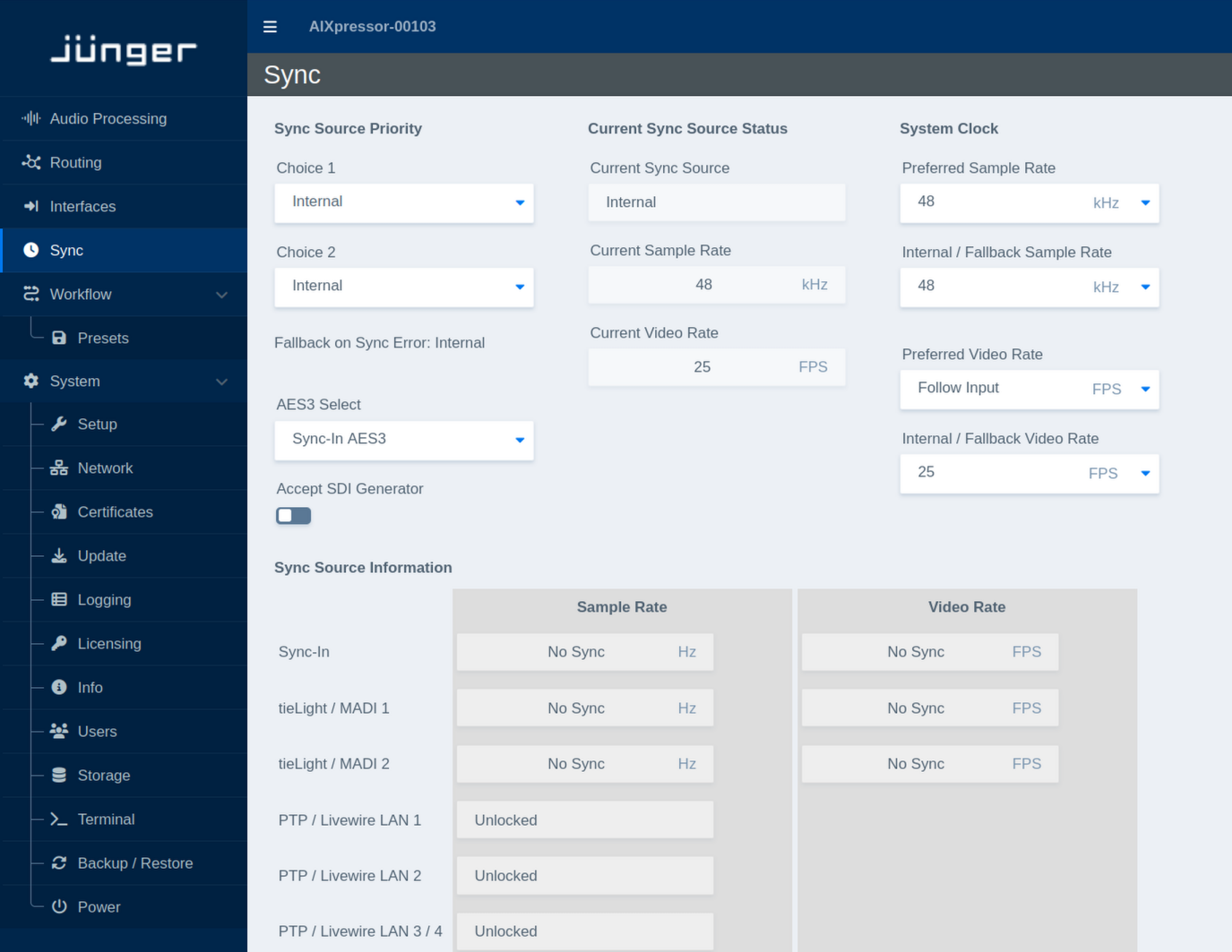
Sync Source Priority
This section defines which synchronization sources the system should use and in which order.
| Parameter | Values | Default | Description |
|---|---|---|---|
| Choice 1 | Available sync sources | - | Defines the preferred synchronization source. The system uses this source whenever a valid sync signal is available. |
| Choice 2 | Available sync sources | - | Defines the secondary synchronization source. It is used if the source selected as Choice 1 is not available or not valid. |
| Fallback on Sync Error | Status | - | Shows the synchronization source used if none of the configured external sync sources can provide a valid signal. The internal clock is used as the final fallback. |
| AES3 Select | Available AES3 sync inputs | - | Selects the AES3 input to be used when AES3 synchronization is selected. The available inputs depend on the installed hardware and interfaces. |
| Accept SDI Generator | On / Off | - | Defines whether synchronization provided by an SDI generator is accepted as a valid sync source. |
Current Sync Source Status
This section shows the synchronization currently used by the system.
| Parameter | Values | Default | Description |
|---|---|---|---|
| Current Sync Source | Status | - | Shows the synchronization source currently used by the flexAI system. |
| Current Sample Rate | Status | - | Shows the current audio sample rate of the system in kHz. |
| Current Video Rate | Status | - | Shows the current video frame rate in FPS. |
System Clock
This section defines the preferred audio and video clock parameters and the values used when the system operates from its internal clock.
| Parameter | Values | Default | Description |
|---|---|---|---|
| Preferred Sample Rate | Supported sample rates | - | Defines the preferred audio sample rate when the selected synchronization source supports or requires a sample-rate selection. |
| Internal / Fallback Sample Rate | Supported sample rates | - | Defines the sample rate used when the system is running from its internal clock or has fallen back to internal synchronization. |
| Preferred Video Rate | Supported video rates / Follow Input | - | Defines the preferred video frame rate. Select Follow Input to follow the video rate provided by the active synchronization source. |
| Internal / Fallback Video Rate | Supported video rates | - | Defines the video frame rate used when the system is running from its internal clock or has fallen back to internal synchronization. |
Sync Source Information
The Sync Source Information section provides a live overview of the synchronization signals detected on the available inputs.
For each sync-capable interface, the table shows the detected Sample Rate and, where applicable, the Video Rate. Depending on the interface and signal state, entries may display a detected rate or a status such as No Sync or Unlocked.
This overview can be used to verify which synchronization signals are currently available before selecting them as a preferred sync source.