
Audio over IP - New Stream Defaults
The New Stream Defaults page defines the initial settings used when new AoIP receiver or sender streams are created.
Changing these settings affects newly created streams only. Existing receivers and senders are not modified.
Select the protocol under Protocol Selection to configure the corresponding defaults. The available parameters may vary depending on the selected protocol.
Protocol
| Parameter | Values | Default | Description |
|---|---|---|---|
| Protocol Selection | Available AoIP protocols | - | Selects the AoIP protocol for which the new-stream defaults are being configured. The available Receiver and Sender parameters may change with the selected protocol. |
SMPTE ST2110 and AES67
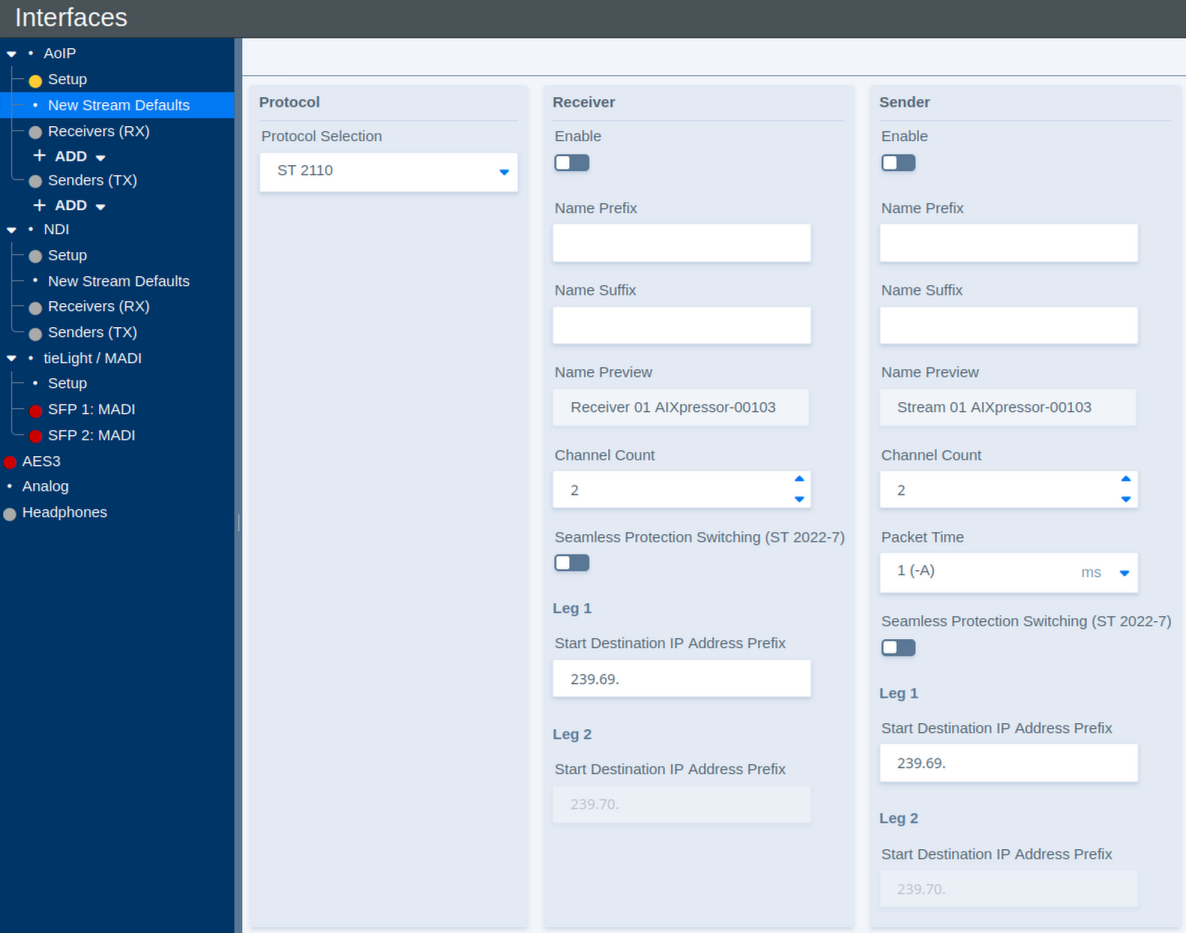
Receiver Defaults
These parameters define the initial configuration of newly created AoIP receivers.
| Parameter | Values | Default | Description |
|---|---|---|---|
| Enable | On / Off | - | Defines whether newly created receivers are enabled by default. |
| Name Prefix | Text | - | Defines an optional prefix added to the name of newly created receivers. |
| Name Suffix | Text | - | Defines an optional suffix added to the name of newly created receivers. |
| Name Preview | Status | - | Shows a preview of the resulting receiver name. |
| Channel Count | Supported channel counts | - | Defines the default number of audio channels for a newly created receiver. |
| Seamless Protection Switching (ST 2022-7) | On / Off | - | Enables SMPTE ST 2022-7 seamless protection switching for newly created receivers. When enabled, redundant stream legs can be received over separate network paths. |
| Start Destination IP Address Prefix – Leg 1 | Multicast IP prefix | - | Defines the starting multicast destination address prefix used for automatic address assignment. When multiple streams are created, the destination addresses are incremented automatically. |
| Start Destination IP Address Prefix – Leg 2 | Multicast IP prefix | - | Defines the starting multicast destination address prefix used for the redundant second stream leg. When multiple streams are created, the destination addresses are incremented automatically. |
Sender Defaults
These parameters define the initial configuration of newly created AoIP senders.
| Parameter | Values | Default | Description |
|---|---|---|---|
| Enable | On / Off | - | Defines whether newly created senders are enabled by default. |
| Name Prefix | Text | - | Defines an optional prefix added to the name of newly created senders. |
| Name Suffix | Text | - | Defines an optional suffix added to the name of newly created senders. |
| Name Preview | Status | - | Shows a preview of the resulting sender name. |
| Channel Count | Supported channel counts | - | Defines the default number of audio channels for a newly created sender. |
| Packet Time | Supported packet times | - | Defines the packet time used for newly created sender streams. Shorter packet times reduce transport latency but increase the packet rate and processing load. |
| Seamless Protection Switching (ST 2022-7) | On / Off | - | Enables SMPTE ST 2022-7 seamless protection switching for newly created senders. When enabled, two equivalent stream legs can be transmitted over separate network paths. |
| Start Destination IP Address Prefix – Leg 1 | Multicast IP prefix | - | Defines the starting multicast destination address prefix used for automatic address assignment. When multiple streams are created, the destination addresses are incremented automatically. |
| Start Destination IP Address Prefix – Leg 2 | Multicast IP prefix | - | Defines the starting multicast destination address prefix used for the redundant second stream leg. When multiple streams are created, the destination addresses are incremented automatically. |
Additional Settings
Additional parameters are available when Show Expert Settings is enabled.
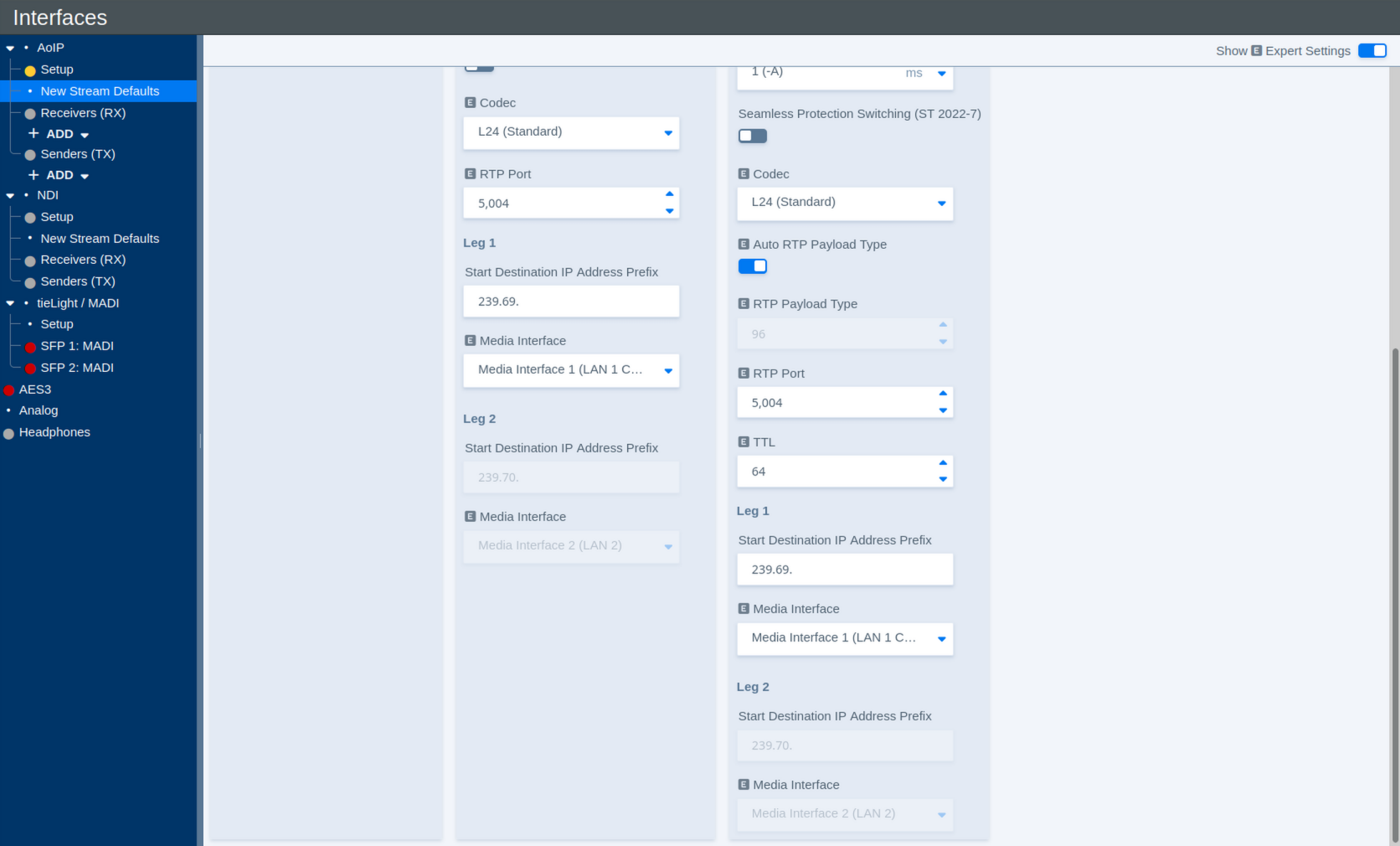
The Expert View adds further Receiver and Sender defaults.
Receiver – Additional Settings
| Parameter | Values | Default | Description |
|---|---|---|---|
| Codec | Available codecs | - | Defines the default audio codec or sample format used for newly created receivers. |
| RTP Port | Port number | - | Defines the RTP port used for newly created receiver streams. |
| Media Interface – Leg 1 | Available Media Interfaces | - | Selects the Media Interface used for the first stream leg. |
| Media Interface – Leg 2 | Available Media Interfaces | - | Selects the Media Interface used for the redundant second stream leg when ST 2022-7 is enabled. |
Sender – Additional Settings
| Parameter | Values | Default | Description |
|---|---|---|---|
| Codec | Available codecs | - | Defines the audio codec or sample format used for newly created sender streams. |
| Auto RTP Payload Type | On / Off | - | Automatically assigns a suitable RTP payload type to newly created streams. Disable this option to specify the payload type manually. |
| RTP Payload Type | RTP payload type | - | Defines the RTP payload type when automatic assignment is disabled. |
| RTP Port | Port number | - | Defines the RTP port used for newly created sender streams. |
| TTL | Number of network hops | - | Defines the IP multicast Time To Live (TTL). The value limits how many routed network hops a multicast stream can traverse. |
| Media Interface – Leg 1 | Available Media Interfaces | - | Selects the Media Interface used to transmit the first stream leg. |
| Media Interface – Leg 2 | Available Media Interfaces | - | Selects the Media Interface used to transmit the redundant second stream leg when ST 2022-7 is enabled. |
Livewire
When Livewire is selected under Protocol Selection, some of the New Stream Defaults differ from those available for ST 2110.
Instead of assigning multicast destination addresses directly, Livewire uses Livewire Channel numbers. These channel numbers determine the corresponding multicast destination used by the Livewire stream.
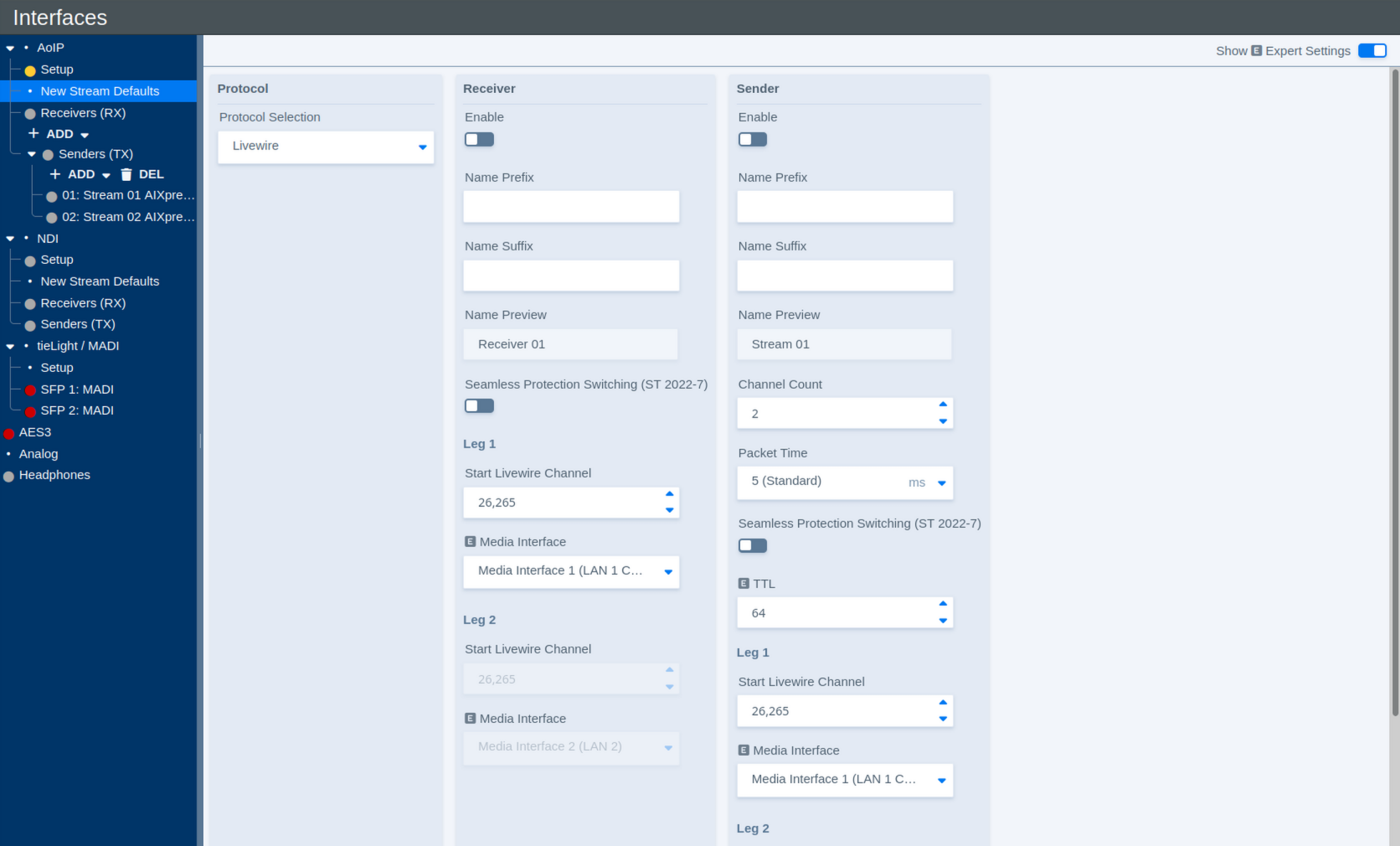
Receiver Defaults
| Parameter | Values | Default | Description |
|---|---|---|---|
| Enable | On / Off | - | Defines whether newly created Livewire receivers are enabled by default. |
| Name Prefix | Text | - | Defines an optional prefix added to the name of newly created receivers. |
| Name Suffix | Text | - | Defines an optional suffix added to the name of newly created receivers. |
| Name Preview | Status | - | Shows a preview of the resulting receiver name. |
| Seamless Protection Switching (ST 2022-7) | On / Off | - | Enables SMPTE ST 2022-7 seamless protection switching for newly created receivers. |
| Start Livewire Channel – Leg 1 | Livewire channel number | - | Defines the first Livewire Channel number used for automatically created receiver streams. When multiple streams are created, the channel number is incremented automatically. |
| Media Interface – Leg 1 | Available Media Interfaces | - | Selects the Media Interface used for the first stream leg. |
| Start Livewire Channel – Leg 2 | Livewire channel number | - | Defines the starting Livewire Channel number for the redundant second stream leg. When multiple streams are created, the channel number is incremented automatically. |
| Media Interface – Leg 2 | Available Media Interfaces | - | Selects the Media Interface used for the redundant second stream leg when ST 2022-7 is enabled. |
Sender Defaults
| Parameter | Values | Default | Description |
|---|---|---|---|
| Enable | On / Off | - | Defines whether newly created Livewire senders are enabled by default. |
| Name Prefix | Text | - | Defines an optional prefix added to the name of newly created senders. |
| Name Suffix | Text | - | Defines an optional suffix added to the name of newly created senders. |
| Name Preview | Status | - | Shows a preview of the resulting sender name. |
| Channel Count | Supported channel counts | - | Defines the default number of audio channels for a newly created Livewire sender. |
| Packet Time | Supported packet times | - | Defines the packet time used for newly created Livewire streams. Shorter packet times reduce transport latency but increase the packet rate and processing load. |
| Seamless Protection Switching (ST 2022-7) | On / Off | - | Enables SMPTE ST 2022-7 seamless protection switching for newly created senders. |
| TTL | Number of network hops | - | Defines the IP multicast Time To Live (TTL). The value limits how many routed network hops a multicast stream can traverse. |
| Start Livewire Channel – Leg 1 | Livewire channel number | - | Defines the first Livewire Channel number used for automatically created sender streams. When multiple streams are created, the channel number is incremented automatically. |
| Media Interface – Leg 1 | Available Media Interfaces | - | Selects the Media Interface used to transmit the first stream leg. |
| Start Livewire Channel – Leg 2 | Livewire channel number | - | Defines the starting Livewire Channel number for the redundant second stream leg. When multiple streams are created, the channel number is incremented automatically. |
| Media Interface – Leg 2 | Available Media Interfaces | - | Selects the Media Interface used to transmit the redundant second stream leg when ST 2022-7 is enabled. |