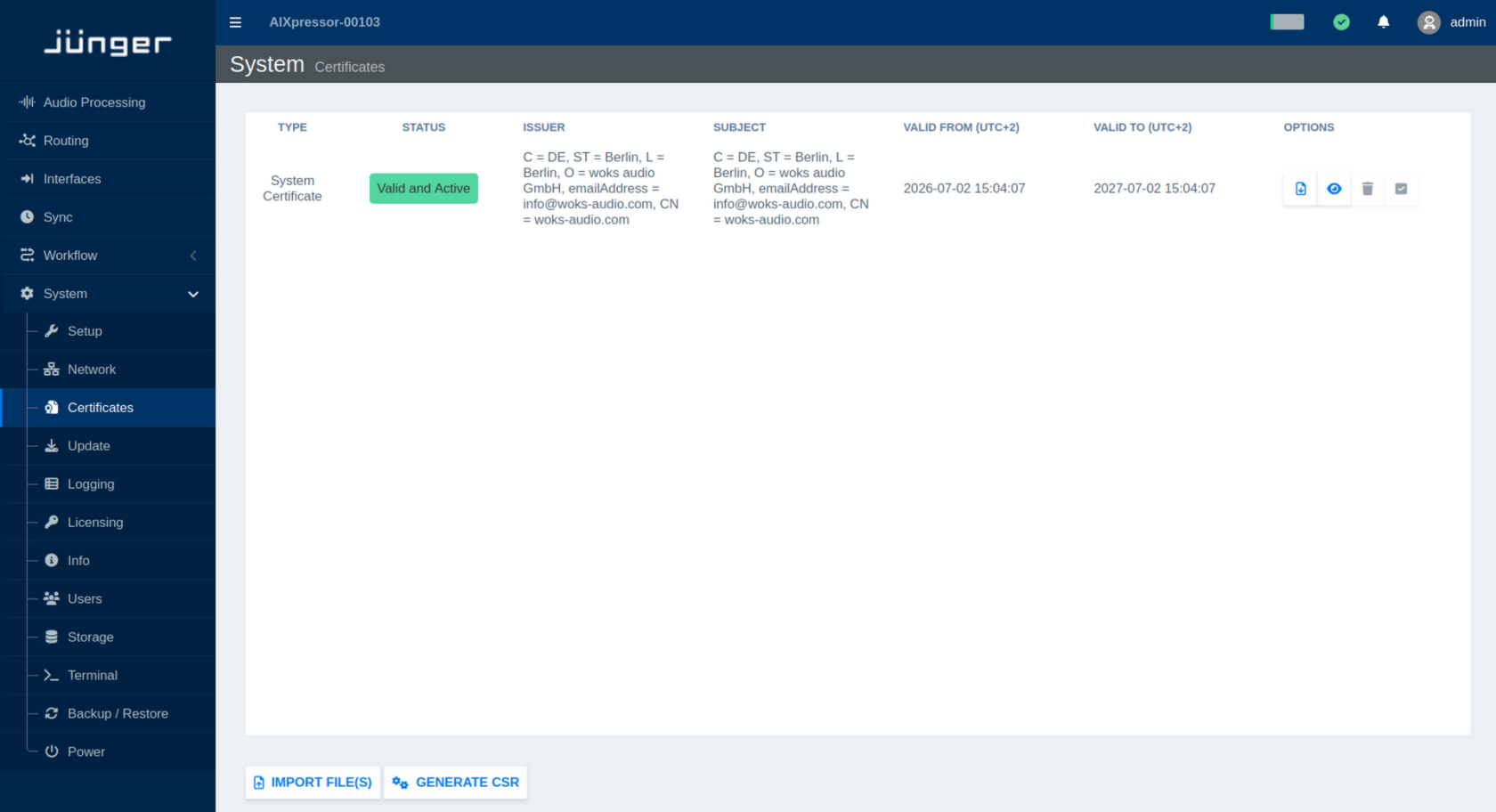
Certificates
Starting with flexAI version 2023-12r1, flexAI supports secure client-server communication using HTTPS.
HTTPS uses TLS to encrypt communication between the flexAI system and clients such as web browsers or other software applications.
Open the Certificates page to view and manage the certificates installed on the system.
System Certificate
By default, flexAI automatically generates and uses a self-signed System Certificate for HTTPS connections.
The System Certificate:
- is generated automatically by the flexAI system,
- is valid for one year,
- is automatically replaced by a new self-signed certificate when it expires,
- requires no user interaction for replacement.
The self-signed certificate provides encrypted HTTPS communication. However, because it is not issued by a Certificate Authority (CA) trusted by the client, most web browsers do not trust it automatically.
As a result, the browser may display a security warning when connecting to the flexAI web interface.
Note - When the System Certificate expires, flexAI automatically generates and installs a new self-signed certificate. Because the replacement certificate is also self-signed, the browser may display a new certificate warning the first time the web interface is opened after the certificate has been replaced.
Using a Trusted Certificate
For production environments, using a certificate signed by a Certificate Authority trusted within your organization is recommended.
You can generate a Certificate Signing Request (CSR) on the Certificates page and have it signed by your organization's CA. The resulting certificate can then be imported into the flexAI system.
For browser validation, the certificate must contain the DNS name used to access the flexAI system in its Subject Alternative Name (SAN) entries. If the system is accessed directly by IP address, the corresponding IP address must be included as an IP SAN.
If the certificate is valid, the requested host name or IP address matches its SAN entry, and the issuing CA is trusted by the client, browsers can establish the HTTPS connection without displaying a certificate warning.
Important - The automatically generated self-signed System Certificate provides encrypted HTTPS communication, but it does not provide identity verification through a Certificate Authority trusted by the client. For production environments, using a CA-signed certificate is strongly recommended.
Certificate Management
On the Certificates page, you can:
- View details of the currently installed certificate.
- Download the currently installed certificate.
- Generate a Certificate Signing Request (CSR).
- Import a CA-signed certificate.
The default self-signed System Certificate is replaced automatically when it expires. CA-signed certificates must be managed and renewed according to your organization's certificate policy.