
AES3
The AES3 page provides configuration and status information for the system's AES3 inputs and outputs. AES3, also commonly referred to as AES/EBU, is a professional digital audio interface standard for transmitting two channels of audio together with related channel status information.
The interface is organized in stereo pairs. Depending on the selected I/O mode, the available AES3 connections are configured either as 8 Inputs / 8 Outputs or 4 Inputs / 12 Outputs.
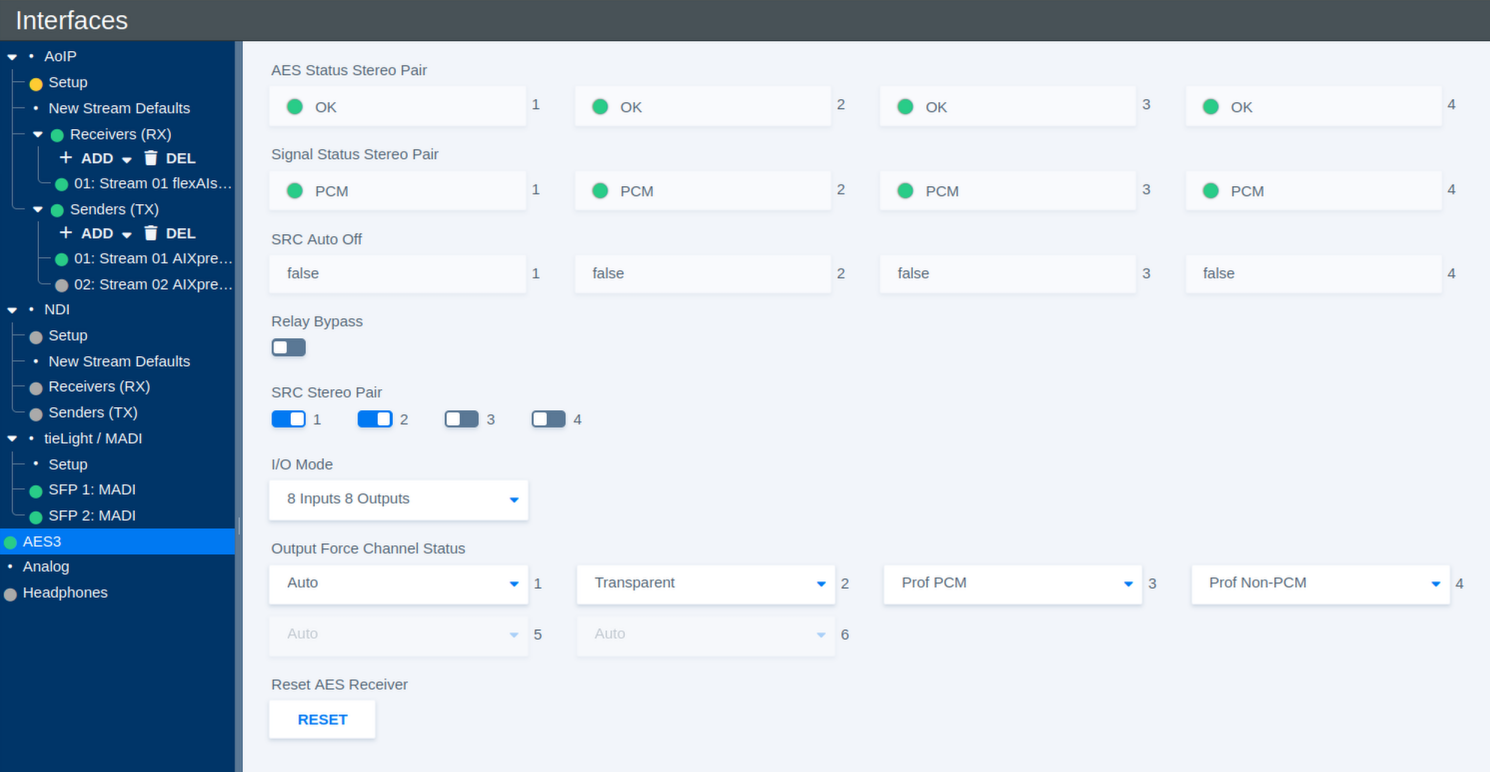
Input Status
The input status indicators provide information about the AES3 signal detected on each stereo pair.
| Parameter | Values | Default | Description |
|---|---|---|---|
| AES Status Stereo Pair | Status | - | Shows whether a valid AES3 signal is detected for each input stereo pair. |
| Signal Status Stereo Pair | Status | - | Shows the detected signal type for each stereo pair, for example **PCM**. |
| SRC Auto Off | Status | - | Shows whether the Sample Rate Converter (SRC) has been automatically disabled for the corresponding stereo pair. |
Sample Rate Conversion
Sample Rate Conversion can be enabled individually for each AES3 input stereo pair.
| Parameter | Values | Default | Description |
|---|---|---|---|
| SRC Stereo Pair 1–4 | On / Off | - | Enables or disables Sample Rate Conversion for the corresponding AES3 input stereo pair. SRC allows incoming AES3 signals with a different or asynchronous sample rate to be converted to the system sample rate. |
Relay Bypass
| Parameter | Values | Default | Description |
|---|---|---|---|
| Relay Bypass | On / Off | - | Activates the AES3 relay bypass path, allowing the corresponding AES3 signal path to bypass normal processing where supported by the hardware. |
I/O Mode
The available AES3 connections can be distributed between inputs and outputs in two ways.
| Parameter | Values | Default | Description |
|---|---|---|---|
| I/O Mode | 8 Inputs 8 Outputs / 4 Inputs 12 Outputs | - | Selects how the available AES3 interfaces are allocated between inputs and outputs. |
Output Channel Status
AES3 carries additional Channel Status information alongside the audio data. The Output Force Channel Status settings define how this information is generated for each AES3 output stereo pair.
| Parameter | Values | Default | Description |
|---|---|---|---|
| Output Force Channel Status | Auto / Transparent / Prof PCM / Prof Non-PCM / Consumer PCM / Consumer Non-PCM | - | Defines the AES3 Channel Status information transmitted with the corresponding output stereo pair. |
The available modes are:
| Mode | Description |
|---|---|
| Auto | Automatically generates channel status information appropriate for the transmitted signal. |
| Transparent | Passes the available incoming channel status information through to the output without intentionally changing its format. |
| Prof PCM | Forces professional AES3 channel status and identifies the signal as linear PCM audio. |
| Prof Non-PCM | Forces professional AES3 channel status and identifies the signal as non-PCM data. |
| Consumer PCM | Forces consumer-format channel status and identifies the signal as linear PCM audio. |
| Consumer Non-PCM | Forces consumer-format channel status and identifies the signal as non-PCM data. |
The Non-PCM modes are intended for signals carrying encoded or other non-linear audio data rather than conventional PCM samples.
Reset AES Receiver
In case an AES3 receiver does not lock correctly to an incoming signal, the corresponding receiver status may remain red.
| Parameter | Values | Default | Description |
|---|---|---|---|
| Reset AES Receiver | Button | - | Resets the AES3 receiver state. If an input does not lock correctly and its status remains red, click Reset to re-establish synchronization with the incoming signal. |
Depending on the hardware platform, the Reset AES Receiver button may not be available. On these systems, receiver recovery is monitored and handled automatically.