
Audio over IP - Receivers
Receivers
The Receivers (RX) section under AoIP contains the receive streams configured on the flexAI system.
Use ADD to create a new receiver. Existing receivers are listed below Receivers (RX) and can be selected individually for configuration. Use DEL to remove selected receivers.
Some receiver parameters are only visible when Show Expert Settings is enabled.
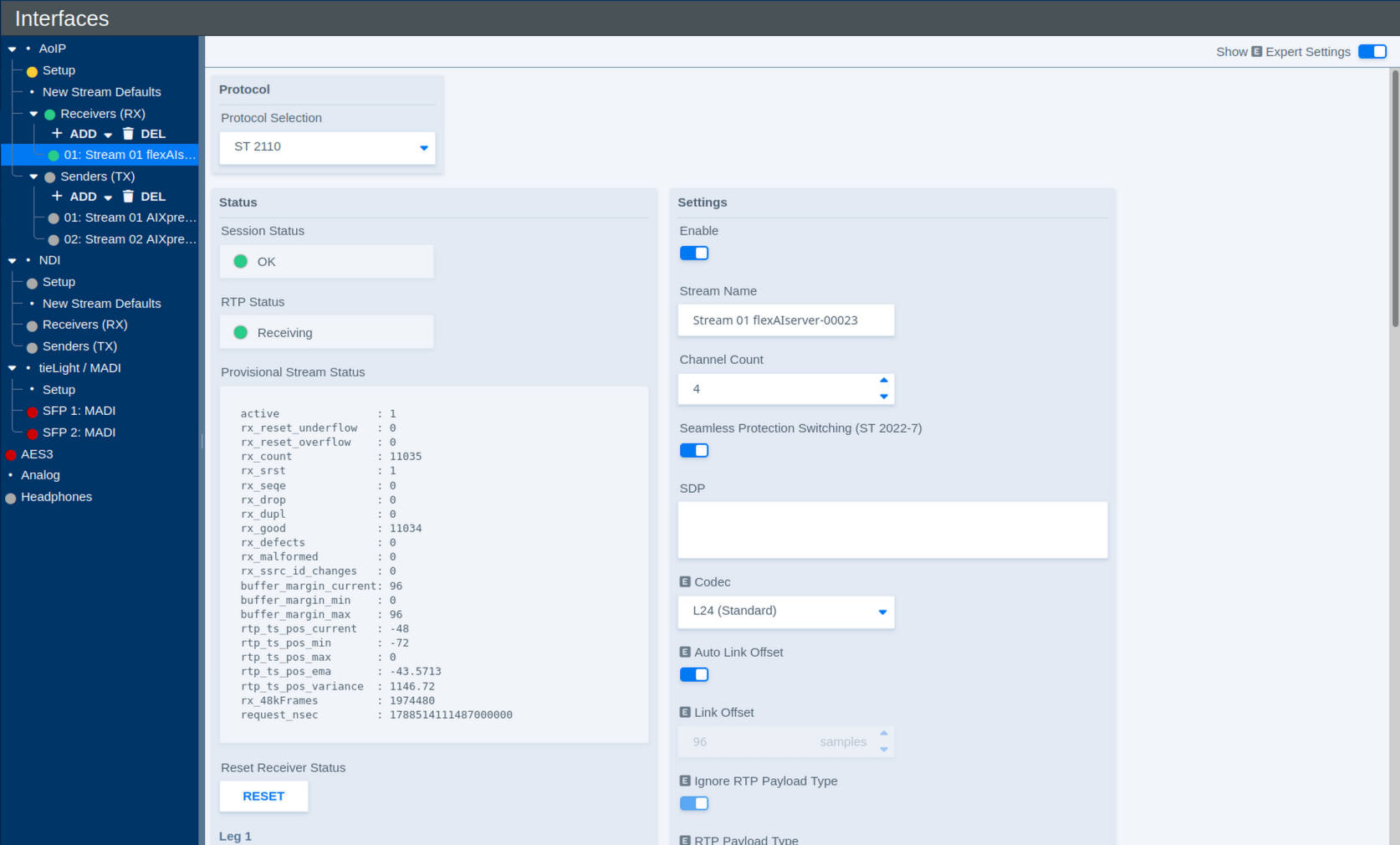
Protocol
| Parameter | Values | Default | Description |
|---|---|---|---|
| Protocol Selection | Available AoIP protocols | - | Selects the protocol used by the receiver. The available settings may change depending on the selected protocol. |
Status
The Status section shows the current operating state of the receiver and its stream legs.
| Parameter | Values | Default | Description |
|---|---|---|---|
| Session Status | Status | - | Shows the overall status of the receive session. |
| RTP Status | Status | - | Shows whether RTP packets are currently being received. |
| Provisional Stream Status | Diagnostic information | - | Provides detailed receiver statistics and diagnostic information about the incoming RTP stream. |
| Reset Receiver Status | Button | - | Resets the displayed receiver status and diagnostic counters. |
| RTP Status – Leg 1 | Status | - | Shows the receive status of both stream legs combined. |
| RTP Status – Leg 2 | Status | - | Currently not used |
The Provisional Stream Status is primarily intended for diagnostics and troubleshooting. For normal operation, the Session and RTP status indicators provide the most relevant overview.
Settings
| Parameter | Values | Default | Description |
|---|---|---|---|
| Enable | On / Off | - | Enables or disables the receiver. |
| Stream Name | Text | - | Defines the name used to identify the receiver within the flexAI system. |
| Channel Count | Supported channel counts | - | Defines the number of audio channels carried by the receive stream. |
| Seamless Protection Switching (ST 2022-7) | On / Off | - | Enables SMPTE ST 2022-7 seamless protection switching. When enabled, two redundant stream legs can be received over separate network paths. |
| SDP | SDP data | - | Defines the Session Description Protocol information for the incoming stream. The original SDP provided by the sender can be pasted directly into this field. Alternatively, SDP information can be obtained from a discovered stream. |
| Codec | Available codecs | - | Defines the expected audio codec or sample format of the incoming stream. |
| Auto Link Offset | On / Off | - | Automatically applies the Link Offset configured for the corresponding stream type and packet time on the AoIP Setup page. |
| Link Offset | Delay in samples | - | Defines the fixed receive/playout delay when Auto Link Offset is disabled. The delay remains constant for the stream, providing deterministic latency. |
| Ignore RTP Payload Type | On / Off | - | Defines whether the configured RTP Payload Type is ignored when receiving the stream. |
| RTP Payload Type | RTP payload type | - | Defines the expected RTP payload type when payload-type checking is used. |
| RTP Port | Port number | - | Defines the UDP port on which the RTP stream is received. |
Pasting the sender's original SDP is often the simplest way to configure a receiver manually, as it transfers the relevant stream parameters in a single step.
Stream Legs
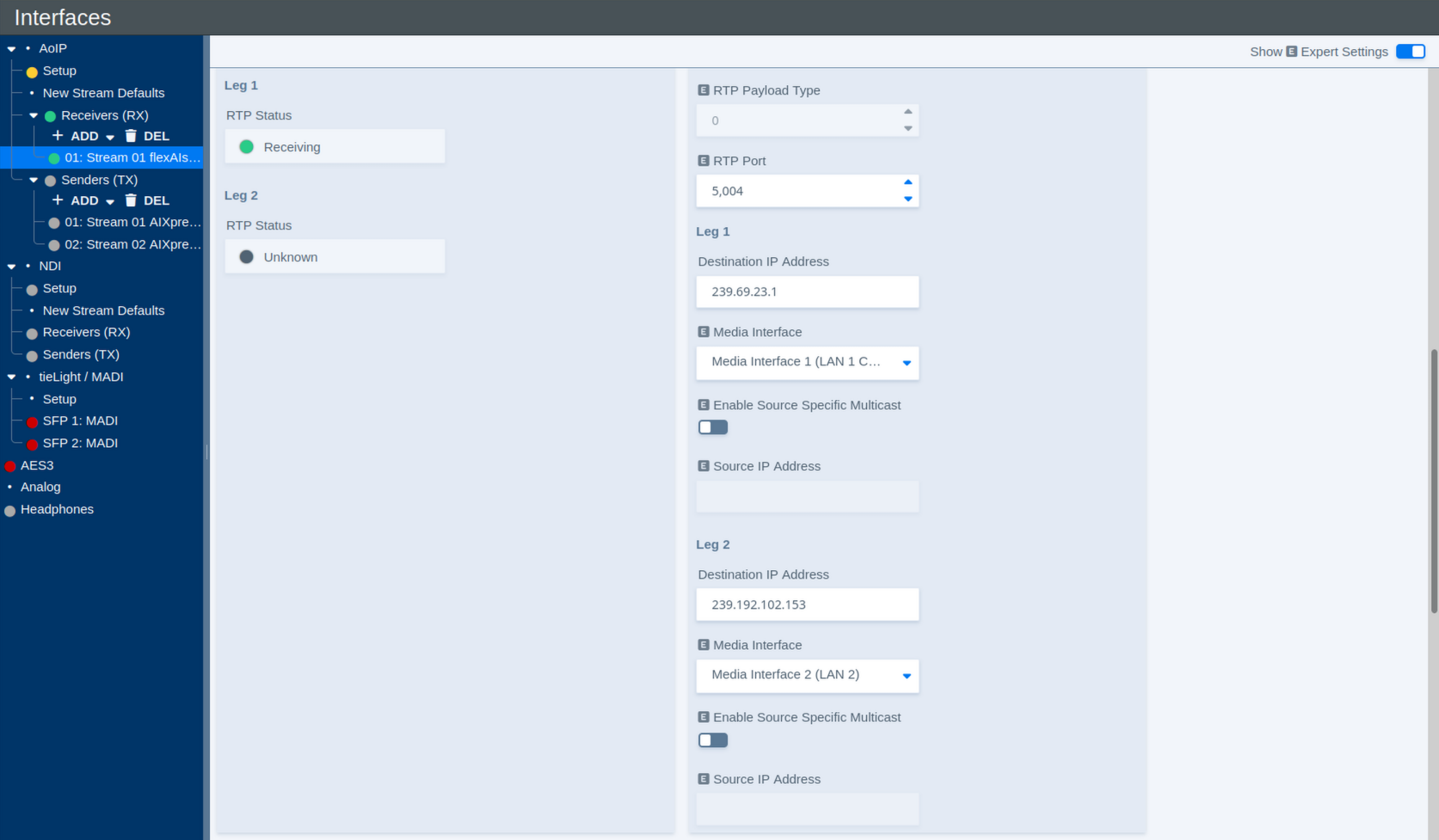
Each receiver can use up to two stream legs. Leg 1 carries the primary stream. Leg 2 is used for redundant reception when ST 2022-7 is enabled.
The following parameters are available for each leg:
| Parameter | Values | Default | Description |
|---|---|---|---|
| Destination IP Address | Multicast IP address | - | Defines the multicast destination address from which the receiver joins the stream. |
| Media Interface | Available Media Interfaces | - | Selects the Media Interface used to receive this stream leg. |
| Enable Source Specific Multicast | On / Off | - | Enables Source-Specific Multicast (SSM) for this stream leg. |
| Source IP Address | IP address | - | Defines the expected source address when Source-Specific Multicast is enabled. |
Each receiver can be assigned individually to one of the available Media Interfaces. This allows different receivers, and, with ST 2022-7, individual stream legs, to use separate physical AoIP networks.
In combination with the internal audio routing, flexAI can also transfer audio between otherwise independent AoIP networks: audio received through one Media Interface can be routed internally and transmitted again through a sender assigned to another Media Interface. This operates at the audio level rather than as a network bridge.
With Source-Specific Multicast (SSM) enabled, the receiver joins the multicast stream from the specified source address rather than accepting traffic for the multicast group from any source.
Stream Discovery
The Discovery section can be used to find available AoIP streams on the network and apply their parameters to the selected receiver.
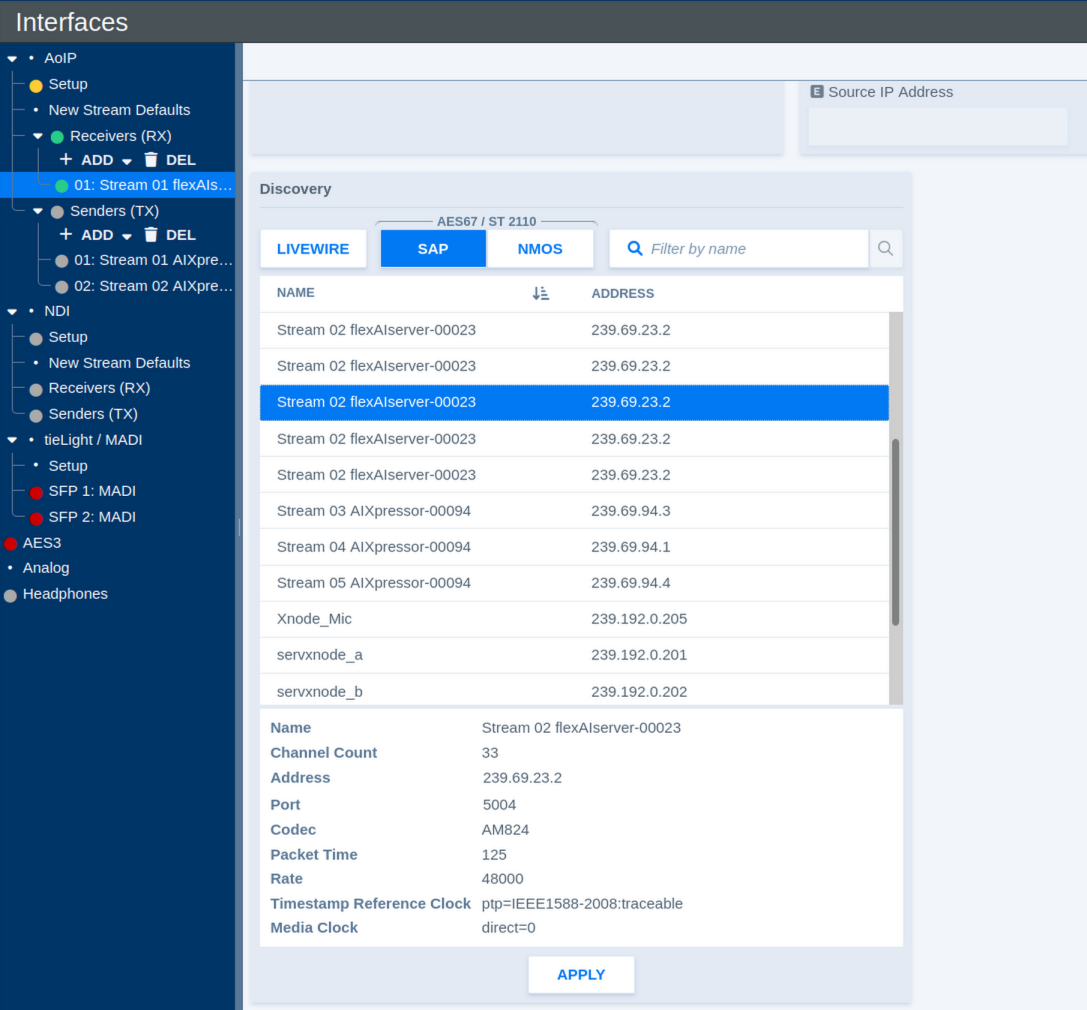
Available discovery methods include:
- Livewire
- SAP for AES67 / ST 2110
- NMOS
Use the protocol buttons to select the desired discovery method. The Filter by name field can be used to narrow the list of discovered streams.
Select a stream to display the information advertised by the sender. Depending on the protocol, this may include information such as:
- Name
- Channel Count
- Destination Address
- RTP Port
- Codec
- Packet Time
- Sample Rate
- Timestamp Reference Clock
- Media Clock
Click Apply to connect the selected stream with the current receiver.
This provides a convenient alternative to entering the receiver parameters manually and helps ensure that the receiver settings match those advertised by the sender.
Livewire Receiver Settings
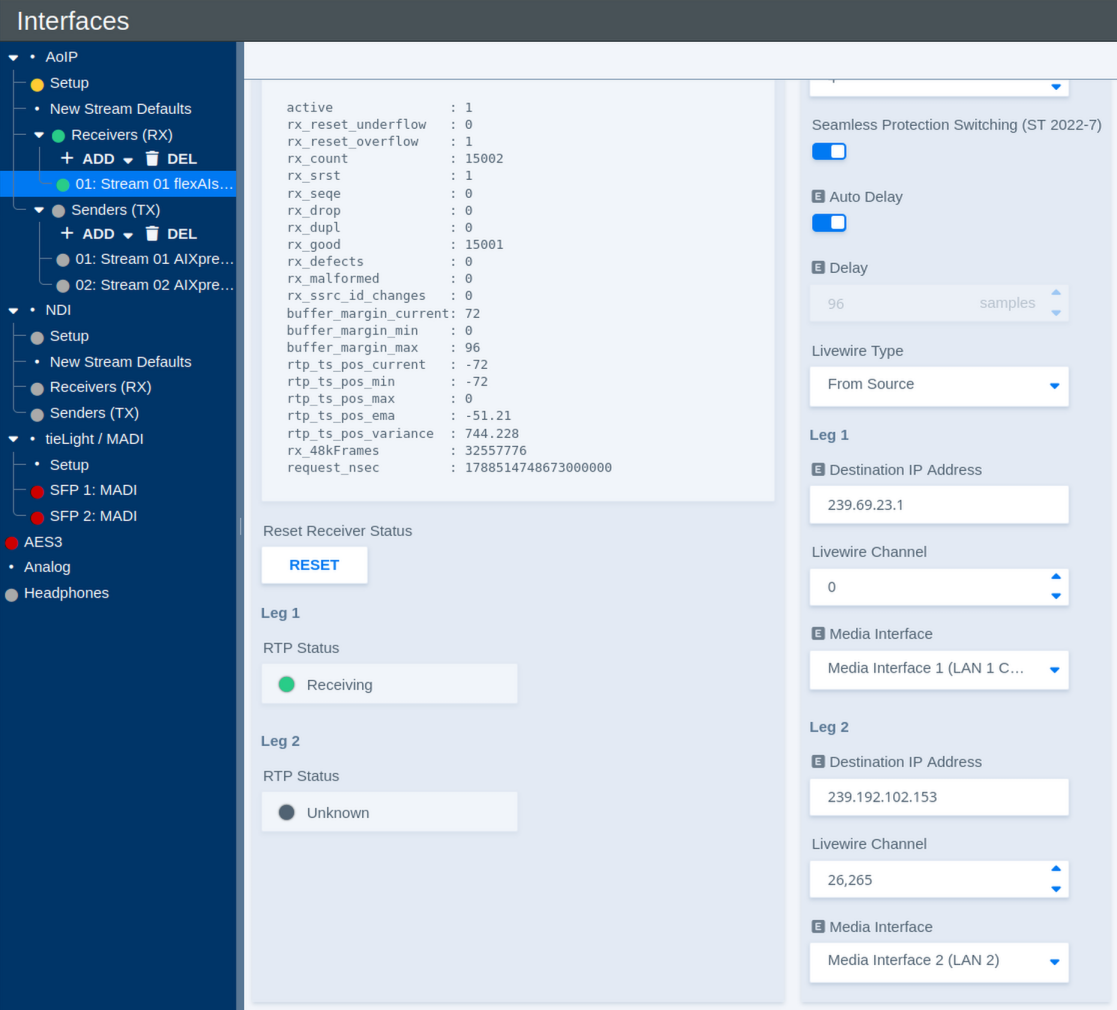
When Livewire is selected under Protocol Selection, some receiver parameters differ from those used for ST 2110.
| Parameter | Values | Default | Description |
|---|---|---|---|
| Auto Delay | On / Off | - | Automatically applies the receive delay configured for the corresponding Livewire stream type on the AoIP Setup page. |
| Delay | Delay in samples | - | Defines the fixed receive/playout delay when Auto Delay is disabled. The configured delay remains constant, providing deterministic latency. |
| Livewire Type | Available Livewire types | - | Defines how the Livewire stream is addressed. To Source uses the Livewire channel information associated with the source stream. |
| Destination IP Address – Leg 1 | Multicast IP address | - | Shows or defines the multicast destination address used for the first Livewire stream leg. |
| Livewire Channel – Leg 1 | Livewire channel number | - | Defines the Livewire Channel used for the first stream leg. The Livewire Channel identifies the corresponding stream within the Livewire network. |
| Media Interface – Leg 1 | Available Media Interfaces | - | Selects the Media Interface used to receive the first stream leg. |
| Destination IP Address – Leg 2 | Multicast IP address | - | Shows or defines the multicast destination address used for the redundant second stream leg. |
| Livewire Channel – Leg 2 | Livewire channel number | - | Defines the Livewire Channel used for the redundant second stream leg. |
| Media Interface – Leg 2 | Available Media Interfaces | - | Selects the Media Interface used to receive the redundant second stream leg when ST 2022-7 is enabled. |
As with other receiver types, Leg 2 is used for redundant reception when Seamless Protection Switching (ST 2022-7) is enabled.